Creating an animated story can sound difficult if you have never used animation software before. You may imagine complicated timelines, drawing tools, and hours of editing. Toontastic takes a very different approach. It was designed to make storytelling feel more like play than professional animation.
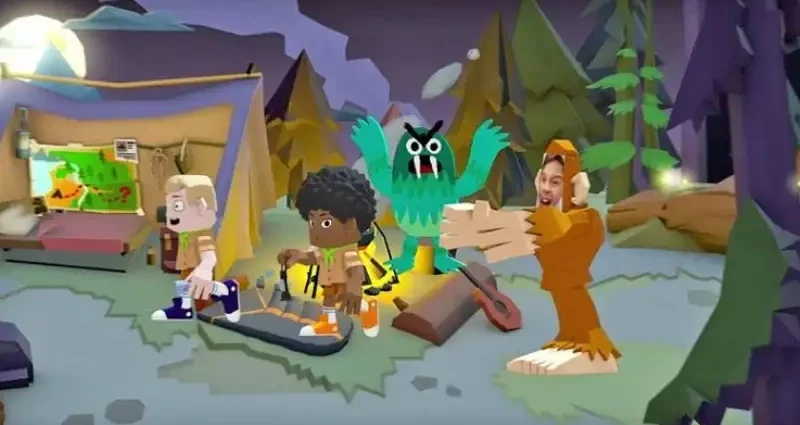
Google introduced Toontastic 3D in 2017 as a creative storytelling app for children. It lets users create cartoons by moving characters around a scene, recording their voices, and turning their performance into a 3D video. Google described it as a digital puppet theatre designed to encourage children to imagine, invent, and explore.
Although the app is no longer a modern animation platform with frequent updates, its concept remains interesting for parents, teachers, students, and anyone researching simple animation tools.
What Is Toontastic?
Toontastic 3D is a storytelling and animation app developed by Google. Instead of requiring users to draw every frame, it provides characters, settings, music, and simple creative tools.
The basic idea is straightforward. You select characters and a scene, move the characters around the screen, and tell your story. The app records the movement and narration together.
The official Google Play listing says users can draw, animate, and narrate their own cartoons. It also lists features such as custom character creation, built-in music, different story structures, and video export.
This approach makes the app different from traditional animation software. You do not need to understand keyframes or complex editing timelines before making your first project.
How Does Toontastic Work?
The creative process follows a simple storytelling workflow.
First, you choose a story idea. It could be a short adventure, a school project, a science explanation, or a fictional news report.
Next, you select a suitable setting and characters. You can move characters around the scene using touch controls. While they move, you can record your narration.
The app combines these elements into a finished animated scene. You can then continue building the story with additional scenes.
The official listing describes three story formats: Short Story, Classic, and Science Report. These structures can help younger creators understand how a story develops instead of simply placing random characters on a screen.
Key Features of Toontastic
1. Character Creation
One of the more creative features is the ability to design your own characters.
The app includes 3D drawing tools that allow users to create customised characters rather than relying entirely on pre-made designs. You can also add yourself to an adventure using photos and customised characters.
This can make a school project feel more personal. For example, a student could create a character representing a scientist and use it in a short explanation about the solar system.
2. Ready-Made Characters and Settings
Not everyone wants to start by designing everything from scratch.
Toontastic 3D includes a collection of characters and environments. The Google Play description mentions themes such as pirates, robots, villains, and other settings designed to encourage imaginative storytelling.
These ready-made elements can help beginners start creating quickly.
3. Voice Recording
Storytelling is not only about movement and pictures. Voice can give characters personality.
Users can narrate their scenes while moving characters around the screen. The app records the voice and animation and saves the result as a 3D video on the device.
For children, this can also turn a writing exercise into a speaking activity.
4. Music and Sound
The app includes built-in music that creators can use to add atmosphere to their projects.
A quiet scene might need gentle background music, while an adventure could benefit from something more energetic. Small details like this can make a simple animation feel more complete.
5. Video Export
The official listing says finished videos can be exported to the device’s Photos library. That makes it possible to save a completed project and share it with family or use it for appropriate school activities.
How Can Students Use Toontastic?
One of the strongest ideas behind the app is that animation can support learning.
For example, a teacher could ask students to create a short science report. Instead of submitting only written notes, students could turn the subject into an animated explanation.
Imagine a student studying the water cycle. They could create characters representing water droplets, move them through different scenes, and explain evaporation, condensation, and precipitation through narration.
History lessons could use a similar approach. Students could create a short scene about a historical event and explain the important facts through dialogue.
The goal is not to replace traditional writing. Instead, animation can give students another way to organise and present what they understand.
Can Toontastic Help With Storytelling Skills?
Yes, its structure can encourage several useful storytelling habits.
A good story needs more than attractive characters. It needs a beginning, a problem or goal, development, and an ending.
Story-based animation encourages creators to think about these elements before they begin recording. A student might first decide what the character wants, what challenge appears, and how the story finishes.
This process can make creative writing more practical. Instead of writing an entire story in a document, a beginner can see how individual scenes connect.
It also encourages spoken storytelling because narration becomes part of the final project.
Is Toontastic Still Available?
This is where users should be careful.
Google’s current Play Store listing for Toontastic 3D is still visible and shows millions of downloads, but the listed app update dates back to November 2017.
There are also reports in the Google Play Community of users encountering compatibility problems or seeing the app described as being made for older Android versions. These reports are community posts rather than an official Google announcement, so they should not be treated as confirmation of a universal availability problem.
In practical terms, this means you should check compatibility on your particular device before planning an important project around the app.
Older applications can behave differently across newer operating systems and devices. If an app installs successfully but has problems opening or exporting projects, that can become frustrating when working on a school assignment.
Is Toontastic Suitable for Beginners?
Its original design makes it particularly approachable for beginners.
You do not need professional animation knowledge to understand the basic workflow. The emphasis is on characters, scenes, movement, narration, and storytelling rather than complicated production controls.
That simplicity can be useful for younger users who want to experiment with animation without first learning professional software.
However, advanced creators may find the feature set limited compared with modern animation and video-editing programs. The app was created around simple, playful storytelling rather than professional film production.
Practical Ideas for Using Toontastic
Here are several project ideas that fit the app’s original purpose:
Create a short story:
Make a three-scene adventure with a clear beginning, problem, and ending.
Explain a science topic:
Turn a lesson into an animated report with characters explaining key ideas.
Make a news report:
Create a fictional news broadcast and practise writing short, clear dialogue.
Build a family story:
Use customised characters to recreate a fun family memory.
Design a game concept:
Create characters and scenes that explain how a fictional game would work.
These projects can help users practise planning, writing, speaking, visual communication, and creative thinking at the same time.
Toontastic vs. Traditional Animation Software
The biggest difference is complexity.
Professional animation programs usually provide extensive control over frames, layers, effects, timing, audio, and visual editing. That flexibility is useful for experienced creators but can overwhelm beginners.
Toontastic 3D takes the opposite approach. It simplifies the process so users can concentrate on storytelling.
That makes it better understood as a creative storytelling tool rather than a replacement for professional animation software.
If your goal is to learn advanced animation production, you will eventually need more sophisticated software. If your goal is to experiment with characters and stories, the simpler approach can be easier to understand.
Final Thoughts
Toontastic 3D introduced a simple idea: children can learn storytelling by becoming the director of their own animated scenes.
Its combination of characters, environments, narration, music, and simple animation tools made it accessible to beginners. Google originally positioned it as a creative tool for children, students, and young storytellers, with applications ranging from cartoons to school reports.
Today, its age is an important consideration. The current Google Play listing reflects an app that has not received a recent update, so compatibility may vary on newer devices.
Still, the underlying concept remains useful. Animation does not always need to begin with complicated software. Sometimes, giving someone an easy way to move a character, tell a story, and record an idea is enough to turn a simple concept into something memorable. For more informative articles, visit our